SpawnItems › Guides · Deutsche Version
RX 9070 XT undervolt: stable settings in 3 steps
The manual way in AMD Adrenalin, the automatic way with a free tool – and why short benchmarks give you values that crash later.
What undervolting the RX 9070 XT gets you
RDNA 4 cards ship with a voltage reserve so that every chip works. Most chips need less. Removing that reserve means less heat, a quieter fan and lower power draw – at the same or nearly the same performance.
| Measured on my RX 9070 XT | Stock | Tuned |
|---|---|---|
| Board power under load | 263 W | 207 W (−56 W) |
| Compute (FP32) | 8263 GFLOPS | 8211 GFLOPS (−0.6 %) |
| Efficiency | 31.4 GFLOPS/W | 39.7 GFLOPS/W (+26 %) |
| Memory bandwidth | 595 GB/s | 657 GB/s (+10 %) |
| Settings | – | −77 mV · VRAM 2750 MHz · power limit −30 % |
Balanced preset, driver 26.11.2, after a 3-minute AI soak at near-full VRAM. Your values will differ – every chip is different, which is exactly why the search is automated.
Why short benchmarks lie
- Load changes crash, not full load. Many unstable undervolts survive a constant stress test but crash when the load jumps – in games during loading screens, or in AI apps between steps. A good test switches between idle and full load on purpose.
- VRAM errors are hidden. GDDR6 corrects transmission errors by repeating them. A memory overclock that is too high does not crash – it just gets slower. You only see it if you measure bandwidth, not if you watch for artefacts.
- AI and video work are harder than games. Image and video generation (ComfyUI, Stable Diffusion, frame interpolation) keep the card at full VRAM for many minutes. Settings that are "game stable" can still crash there – see the AI crash fix.
Method 1: by hand in AMD Adrenalin
- Open AMD Software: Adrenalin Edition → Performance → Tuning → Custom.
- Enable GPU Tuning and set the voltage offset to −30 mV. Run a 10-minute test with load changes (a game with frequent loading, or a benchmark loop).
- Stable? Go 10 mV lower and repeat. At the first crash, go back 15–20 mV from the failing value – that is your safety margin.
- Enable VRAM Tuning, raise the max frequency in 25 MHz steps and measure bandwidth or FPS each time. Stop when the result no longer improves – a higher clock that measures slower is already correcting errors.
- Enable Power Tuning and lower the power limit in 5 % steps while watching FPS. Stop where performance starts to drop noticeably.
- Run something long and real (a 30-minute gaming session or an AI render) before you trust the result.
Method 2: automatically with the Sweet-Spot Tuner
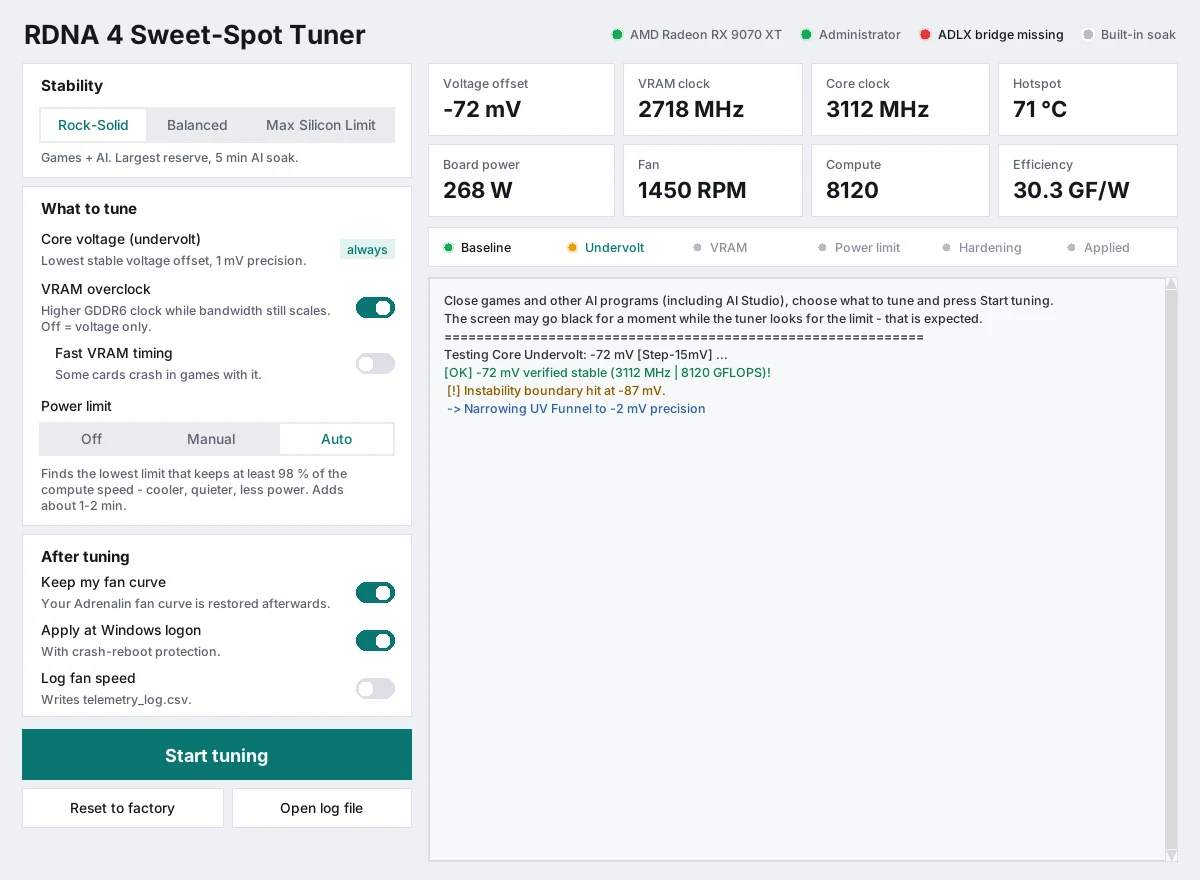
- Download the tuner (ZIP, about 10 MB), unzip it and start it as administrator.
- Pick a preset: Rock-Solid (largest reserve, 5-minute AI soak), Balanced or Max Silicon Limit.
- Choose what to tune – voltage always, VRAM overclock and power limit (off, manual or automatic) are optional – and press Start tuning.
It searches the voltage in 1 mV steps, the VRAM clock in 5 MHz steps with a bandwidth check, finds a power limit that keeps at least 98 % of the compute speed, and then proves the result under a long AI workload with load steps, near-full VRAM and a video-interpolation phase. The values are applied at every Windows sign-in with crash-reboot protection, and Reset to factory undoes everything with one click. The tool needs no internet connection.
RX 9070 and RX 9060 XT
The same method works on the RX 9070 and the RX 9060 XT; the tuner supports all three. Expect different numbers – the 9060 XT has a smaller power budget, so the absolute savings are smaller.
Frequently asked questions
Is undervolting the RX 9070 XT safe?
Yes. Lowering the voltage reduces stress on the chip. The worst case of a too-low value is a crash or driver reset, not damage. AMD exposes these controls in its own Adrenalin driver, and a reset restores factory values.
Does undervolting reduce performance?
Usually not noticeably. On my card compute dropped by 0.6 % while power fell from 263 W to 207 W. A voltage that is too low can make the card clock down – that is why the result should be measured, not guessed.
What is a good undervolt for the RX 9070 XT?
There is no universal number – every chip is different. Mine is stable at −77 mV with the Balanced preset. Test your own card with long, changing loads, or let the tuner search for you.
Do I have to re-tune after a driver update?
Yes, it is recommended. A new driver can reset values or change how stable a value is. Run the tuner again after major driver updates.
Why does my PC crash in AI or video renders but not in games?
AI and video workloads keep the VRAM nearly full for many minutes and change load constantly. Read the AI crash fix for the cause and the fix.
Does it work on Linux?
Yes, the repository contains a command-line version for Linux.
RDNA 4 Sweet-Spot Tuner
Free, open source (MIT), Windows 10/11 · Linux: command line